
As a technical fellow I thrive on sharing my knowledge with others. I like to help others succeed in their field and understand what I’ve been so thankful to learn — mostly from experience, others, and by getting my hands dirty, doing a lot of mess, and then cleaning up after myself. I would say one of the most efficient ways to learn something is to get your hands dirty, fail by doing, figure out what you did wrong, and then learn from it.
#The Module

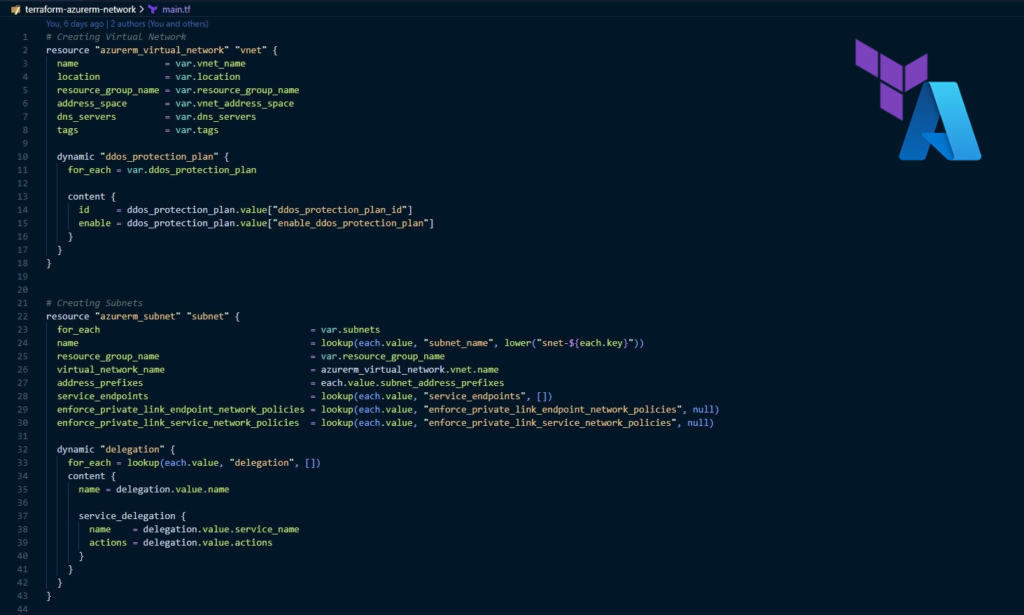
In this Terraform module, I gathered a few resources that I’ve been using for a while to create and deploy an Azure network. I looked around the internet and public code repositories and didn’t find a module that had all these options and resources in one module.
So I decided to develop one myself, first and foremost to document my work so it doesn’t get lost in an endless flow of information and code, learn something while developing, and especially documenting the code and the module — as that took a longer time than writing and testing the code — and last but not least, a hope that this will at least help someone out there making their work a tiny bit easier or at least help moving forward with similar challenges.
#What Does It Deploy?
The module deploys a few network resources:
- Azure Virtual Network
- Subnets — defined in code, variables, and even in Terraform locals
- Network Security Groups — with inbound and outbound rule sets
- Route Tables and Routes
- Azure DDoS Protection Plan — optional association to the virtual network
It has the option to associate an already created Azure DDoS Protection Plan to the virtual network, as it didn’t make any sense creating the DDoS plan within the module since there is a limitation on creating only one Azure DDoS Plan Protection per region at the moment.
#Get Started
Feel free to have a look at the module on GitHub, see what it does, and use it by all means.
As this was my first technical blog post, I want to thank you for reading and I hope you found this article useful. Stay tuned for more to come!