
#The Spark
Picture this: I’m reading the Squad framework docs by Brady Gaster and the team. Multi-agent AI development. Agents that collaborate, write code, open pull requests. The docs mention running on AKS with KEDA for event-driven scaling.
Then during my Atea TechnoCamp 2026 session, someone asks the question. “Does this work on Azure Container Apps?”
That question stuck with me. Because I know ACA. I know Container App Jobs are ephemeral and event-driven. They scale to zero. KEDA is built in. No cluster management. No kubectl. The concept of ephemeral containers mapped perfectly to AI agent work. Wake up. Do the job. Shut down. No state leaks.
So I decided to find out.
Three days later, I had a working platform. AI agents that wake up from a Storage Queue message, clone a repo, write code with GitHub Copilot CLI, open a pull request, and shut down. Zero cost when idle.
Here’s the part that still makes me smile. The agents that built this platform? They were Squad agents. Running in Squad. Building the infrastructure for Squad on ACA. Chewie wrote the Terraform. Lando built the Dockerfile. Bodhi wired the Function App (more on that later).
Squad agents built the platform that runs Squad agents. The irony is delicious.
I will not lie. I expected this to take a week. It took three days. Not because it was easy, but because I had a team of AI agents doing much of the implementation work alongside me. That changed the pace of everything. The iteration speed was something I hadn’t experienced before.
#What Squad On ACA Actually Does
The user experience is simple. Issues in, pull requests out.
- A developer labels a GitHub issue with
squad:chewie(or any agent name) - A GitHub Actions workflow fires on the label event
- The workflow authenticates to Azure via OIDC (zero secrets in GitHub) and enqueues a message to an Azure Storage Queue
- KEDA polls the queue every 30 seconds. It detects the message and triggers a Container App Job
- The container boots, clones the repo, and pipes a structured prompt to
copilot --yolo --agent squad - Copilot reads the
.squad/team.mdfile, routes to the correct agent, and writes code - The container pushes a branch and opens a PR with a full summary
- The container shuts down. Gone. No state persists.
The developer never leaves GitHub. Issues in, PRs out.
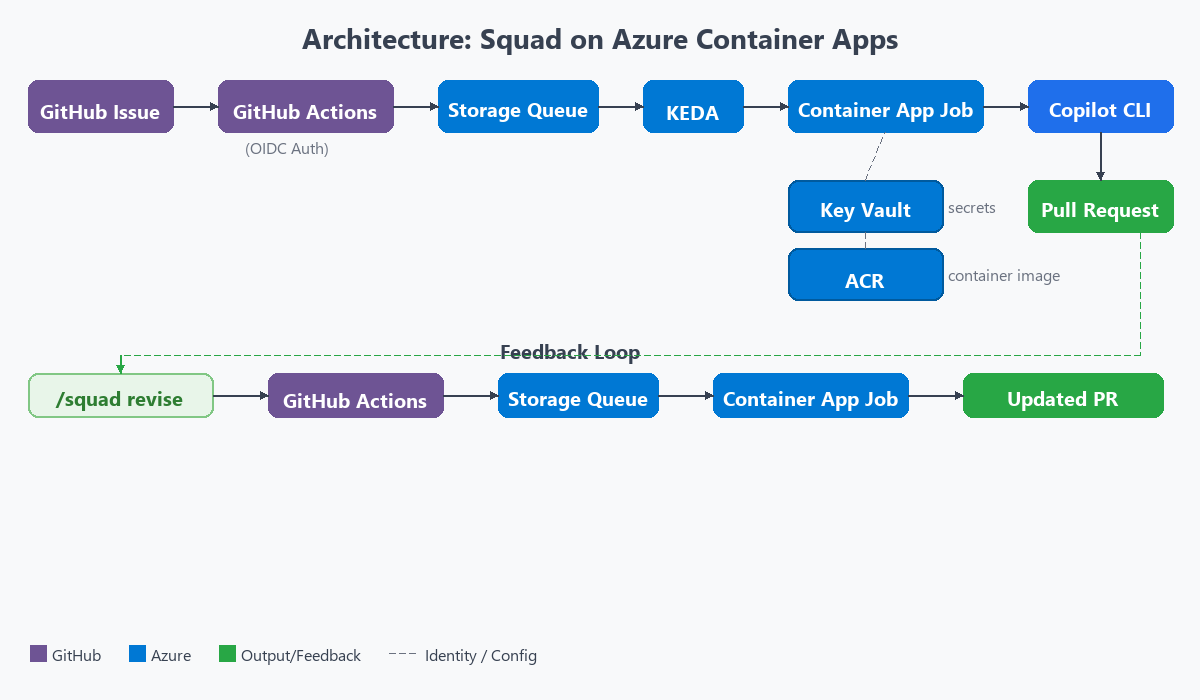
The magic moment is step 5. One line in the entrypoint script kicks off everything:
echo "${SQUAD_PROMPT}" | copilot --yolo --agent squadThat’s it. The prompt goes in. Code comes out. The --yolo flag auto-approves all tool calls. I’ll explain why that’s safe later.
The queue message that triggers all of this? It’s surprisingly small:
{
  "issue_number": 42,
  "agent_type": "chewie",
  "repo": "haflidif/squad-on-aca",
  "title": "Fix auth endpoint timeout"
}
One JSON message. That’s all it takes to wake an AI agent.
The GitHub Actions workflow that sends this message is equally minimal. When a developer adds a squad:* label to an issue, this workflow authenticates to Azure via OIDC and drops the message into the queue:
# .github/workflows/squad-queue.yml
on:
  issues:
    types: [labeled]

jobs:
  enqueue:
    if: startsWith(github.event.label.name, 'squad:')
    runs-on: ubuntu-latest
    permissions:
      id-token: write
    steps:
      - name: Azure Login (OIDC)
        uses: azure/login@v2
        with:
          client-id: ${{ secrets.AZURE_CLIENT_ID }}
          tenant-id: ${{ secrets.AZURE_TENANT_ID }}
          subscription-id: ${{ secrets.AZURE_SUBSCRIPTION_ID }}

      - name: Enqueue agent message
        uses: azure/cli@v2
        with:
          inlineScript: |
            AGENT=$(echo "${{ github.event.label.name }}" | cut -d: -f2)
            MSG=$(jq -nc --arg i "${{ github.event.issue.number }}" \
                        --arg a "$AGENT" \
                        --arg r "${{ github.repository }}" \
                        --arg t "${{ github.event.issue.title }}" \
            '{issue_number:($i|tonumber),agent_type:$a,repo:$r,title:$t}')
            az storage message put \
              --queue-name squad-jobs \
              --content "$(echo "$MSG" | base64 -w0)" \
              --account-name ${{ vars.STORAGE_ACCOUNT }} \
              --auth-mode login
No Azure Functions. No polling. No infrastructure beyond the queue itself. The label event triggers instantly, and KEDA picks up the message within 30 seconds.
But it doesn’t stop at the first PR.
#The Revision Loop
This is where it gets interesting. Reviewers can comment /squad revise on any bot-generated pull request. That triggers a separate workflow. It validates a set of guards first: is this the right branch pattern? Was the PR authored by the bot? Does the commenter have write access? Is there already a revision in progress?
If all guards pass, it collects all review comments, both review-level and inline code comments. It enqueues a type: "revise" message to the same Storage Queue. KEDA spins up a new container.
The agent checks out the existing branch, verifies the HEAD SHA hasn’t moved (a stale check to prevent revisions on a branch someone else already pushed to), builds a revision prompt with the review feedback and diff context, runs Copilot CLI again, and pushes additive commits. No force-push. Never force-push.
A complete issues in, PRs out, review, revise, merge loop. Without ever leaving GitHub.
#The Struggles
Good stories need honest struggles. This build had plenty. I counted eight distinct problems along the way. Here are the four that shaped the architecture the most.
#GitHub App Licensing Gap
I wanted to do authentication the right way. A GitHub App for the bot identity. Org-owned. Short-lived tokens. Minimal scopes. Clean audit trail.
One problem. GitHub Apps can’t hold Copilot licenses. They’re organizational identities, not users. The Copilot CLI checks the GITHUB_TOKEN and validates that the associated account has an active Copilot subscription. An App token fails that check. Every time.
That one limitation shaped the entire authentication architecture.
The solution: a dual-token pattern. The container holds two tokens at the same time. An App installation token for git operations, PR creation, and label management. A separate Copilot PAT from a licensed user, stored in Azure Key Vault, used only for the copilot --yolo invocation.
The entrypoint swaps tokens at runtime:
# Before Copilot: swap to Copilot PAT
export GITHUB_TOKEN="${COPILOT_TOKEN}"
copilot --yolo --agent squad

# After Copilot: swap back to App token
export GITHUB_TOKEN="${APP_TOKEN}"
git push origin "${BRANCH}"
gh pr create ...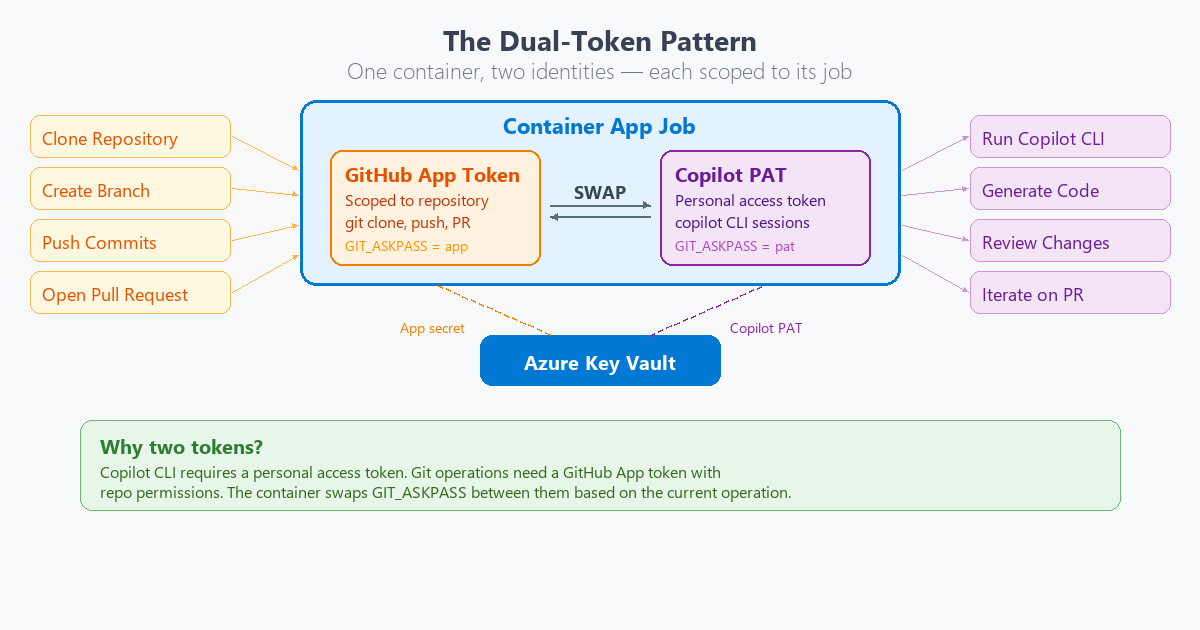
It works. It isn’t elegant. If GitHub ever allows Apps to hold Copilot licenses, this entire pattern disappears. I hope that day comes.
#Identity-Based Auth Everywhere
Here is a fun constraint. My Azure subscription enforces allowSharedKeyAccess=false on storage accounts. Connection strings don’t work. Period. Every KEDA tutorial shows connection string auth. None of them worked in my environment.
At first, this felt like fighting the platform. Every tutorial I followed said “use a connection string.” Every one of them failed. Then it became a gift.
No connection strings. No shared keys. No exceptions.
Every service got Managed Identity. The Function App. The KEDA scaler. The container’s self-dequeue. Key Vault access. And GitHub Actions uses OIDC federated credentials to authenticate to Azure. Zero secrets stored anywhere in the platform. Not one.
The constraint forced the right pattern. Sometimes the best architecture comes from having no shortcuts available.
#KEDA Identity Auth
This one took hours to figure out.
I started with the Azure Verified Module (AVM) for Container App Jobs. It only supports secretRef for KEDA auth. That means connection strings. Which don’t work in my environment.
I dropped to the azurerm Terraform provider. It doesn’t expose the identity field at the KEDA scale rule level. The Azure REST API supports it. Terraform hasn’t caught up yet.
So I dropped again. All the way to azapi_resource. Terraform’s escape hatch for calling the ARM API directly.
# KEDA scale rule with identity-based auth
# (only possible with azapi_resource)
rules = [{
  name = "queue-scaling"
  type = "azure-queue"
  metadata = {
    queueName   = var.queue_name
    queueLength = "1"
    accountName = local.storage_account_name
  }
  identity = azurerm_user_assigned_identity.squad_agent.id
}]
I deployed. Nothing happened. KEDA had been failing silently for hours with the connection string approach. The queue had been accumulating messages the whole time.
Then identity auth clicked. 14 executions triggered at once.
I watched the Azure Portal. Container after container spinning up. Branches being created. PRs appearing in the GitHub notifications. All from a backlog of queued messages that finally had a scaler that could read them. I can tell you, that was a moment. The kind where you lean back in your chair and just watch.
#Bodhi Gets Laid Off
This is my favorite part of the story.
Version one of the platform used an Azure Function App as the bridge between GitHub and the Storage Queue. A Python timer trigger that polled GitHub every few minutes, looking for labeled issues. An agent named Bodhi built it. It was his entire job. Function Dev.
It worked. But it required a lot of infrastructure. An App Service Plan. The Function App itself. A system-assigned managed identity. Three RBAC role assignments. Python code. A host.json. A requirements.txt. And the timer-based polling meant there was always a delay between an issue being labeled and an agent waking up. Minutes, not seconds.
Then I looked at the problem again. GitHub Actions already triggers on label events. Instantly. It already supports OIDC for Azure auth. It already runs at scale. One YAML file could replace all of it.
So I wrote squad-queue.yml. And it did.
One YAML file replaced the Python function code, the host.json, the requirements.txt, the App Service Plan, the Function App, and three RBAC assignments. Event-driven. Instant. Zero Azure infrastructure beyond the Storage Queue itself.
And with that, Bodhi’s role disappeared.
I moved Bodhi to .squad/agents/_alumni/. Honorable discharge, not deletion. His knowledge is preserved. The lessons learned during the Function App iteration live on, even if the infrastructure didn’t.
The moment landed for me. We started with four separate container jobs, one per agent type. Simplified to one generic job when I realized the queue message already knows who it is for.
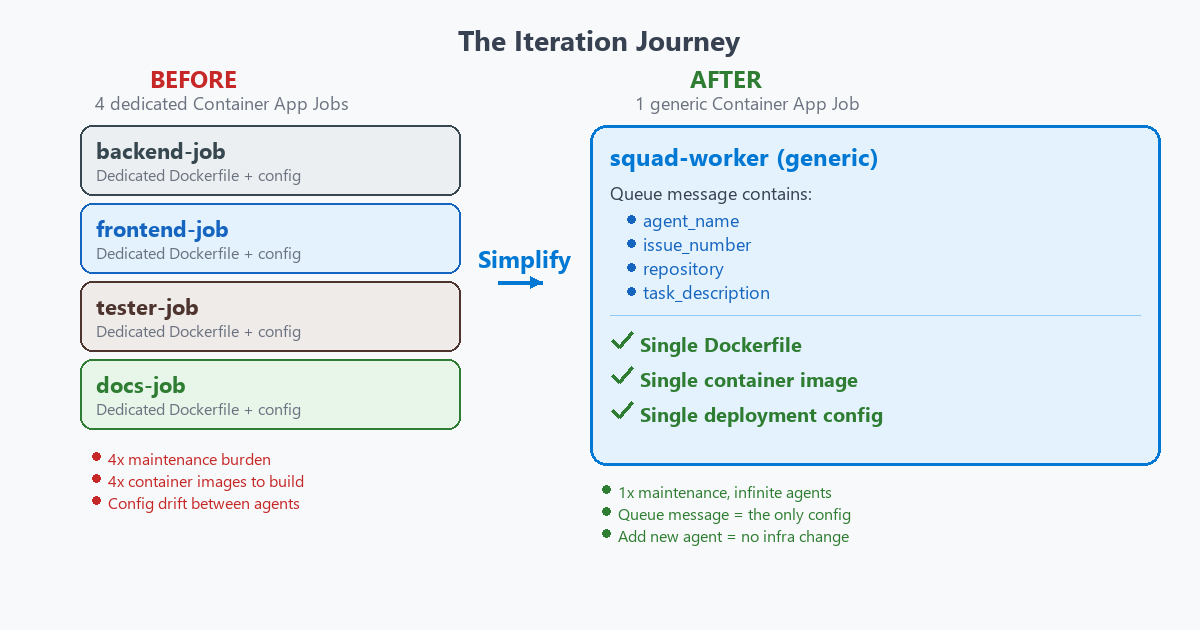 Built an Azure Function to poll GitHub. Simplified to a YAML file when I realized GitHub Actions was already doing the polling for us. And along the way, an AI agent got made redundant by a simpler solution.
If AI agents can become obsolete through architectural iteration, that says something interesting about the pace of change in these systems. Not a warning. Just an observation.
That observation aside, the architecture that survived all this iteration? It earned every layer.
#What Makes This Work
Four things make the architecture click.
Scale to zero. KEDA polls the queue. No messages, no containers. Zero cost when agents are idle. The platform sleeps until someone labels an issue.
Ephemeral container isolation. Each job gets a fresh container. No shared filesystem. No cached state. No leaking environment variables. This is why --yolo mode is safe. Copilot auto-approves all tool calls inside the container. Sounds dangerous? It isn’t. Even if Copilot makes destructive changes, they are contained to a disposable workspace on a feature branch. A human must review and merge. If it all goes wrong, there is a graceful fallback. The container creates a work artifact with the last 50 lines of Copilot output and opens a diagnostic PR anyway. Context is never lost. Each container is a clean room. Born, does its job, dies.
The .squad/ directory as institutional memory. Every container is ephemeral, but the knowledge isn’t. The .squad/ directory lives in the repo. Agent charters. Team decisions. Accumulated learnings from every session. It flows through git. When a new container spins up and runs copilot --agent squad, the first thing it does is read .squad/team.md. That file knows the team roster, the casting rules, and the accumulated context from every previous session. The containers die, but the brain survives. It grows smarter with every PR. This is the pattern that makes stateless containers feel stateful. Git becomes the persistence layer.
GitHub-native workflow. Label an issue. Get a PR. Comment /squad revise. Get a revision. Merge. The developer never leaves GitHub. No dashboards. No third-party tools. No context switching.
The first time a PR appeared from a container, I just stared at it. The agent summary. The diff stats. The commit log. A real, reviewable pull request. Created by a container that no longer existed. That felt like the future arriving quietly.
#What It Costs
The numbers tell the story.
| Component | Cost | Notes |
|---|---|---|
| Container App Job | $0.000017/sec | Only when running |
| Storage Queue | ~$0.001/M ops | Negligible |
| Key Vault | ~$0.60/mo | Fixed |
| Container Registry | $5.00/mo (Basic) | Fixed |
| Log Analytics | ~$0.50/GB | Optional |
Example workload: 100 issues/month at 5 minutes each comes to roughly $6/month total. Most of that is the fixed cost of ACR and Key Vault.
Compare that to an AKS cluster sitting idle at $72/month. Or an always-on App Service at $15 to $50/month. The serverless model wins when workloads are bursty and unpredictable. And AI agent work is exactly that.
#The Potential
This is where it gets exciting.
If GitHub allows Apps to hold Copilot licenses, the dual-token pattern vanishes. One token. One auth flow. No Key Vault for the Copilot PAT. The architecture gets dramatically simpler.
A single issue could trigger multiple agents in parallel. Backend, frontend, and test agents each opening their own PR from the same issue. Fan-out from one label event. I haven’t built that yet, but the architecture supports it today.
The architecture isn’t limited to GitHub issues either. Any event that can produce a Storage Queue message could trigger agents. PR comments (already done with /squad revise). Scheduled maintenance tasks. CI failures that need automated fixes. Slack messages. Azure DevOps work items. External webhooks. The queue is the universal trigger. Everything else is just an event source.
The project is open source under MIT. I would love to see the community take it further. Multi-region deployment. Retry strategies for failed runs. Custom models beyond Copilot CLI. Automated PAT rotation. Teams or Slack notifications when agents complete work. The foundation is there. Build on it.
I’m genuinely grateful to Brady Gaster and the team for building the Squad framework. Without Squad, this project doesn’t exist. The multi-agent orchestration, the casting system, the .squad/ directory pattern. All of that is their work. I just asked the question: “What if this ran on ACA?”
#Try It Yourself
The repo is live: github.com/haflidif/squad-on-aca
The docs/adoption-guide.md has full deployment steps. You need an Azure subscription, a Copilot license, Terraform, and a GitHub App. The README walks through everything.
If you build something with it, I want to hear about it. Open an issue. Send a PR. Tell me what breaks.
Thank you for reading. Here’s to AI agents building platforms for AI agents! 🤖