
#The Idea
If you had told me a few months ago that I would rebuild my entire blog from scratch, not by writing code myself, but by having a conversation with an AI, I probably would have raised an eyebrow. But here we are, and the result has been nothing short of incredible.
For a while now, I had been running my blog on WordPress, hosted on Hostinger. It served me well, but I kept bumping into the same frustrations. The cost of hosting, the bloat of plugins, the limitations when I wanted to customize something specific, and the nagging feeling that as a technical person, I should have more control over my own site.
So I decided it was time for a change. And the tool I chose to help me? GitHub Copilot.
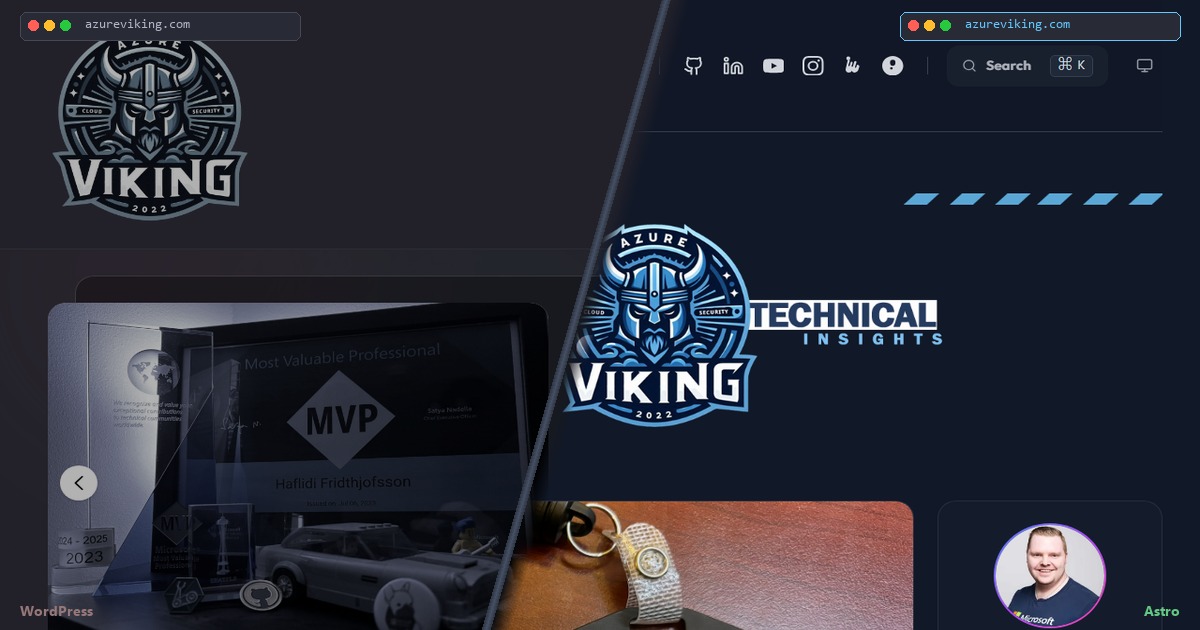
#Why Move Away from WordPress?
Don’t get me wrong, WordPress is a great platform for many use cases. But for a personal technical blog, I found myself wanting:
- More control over the design and code
- Faster page loads without heavy PHP and database overhead
- Free hosting instead of paying for Hostinger
- Version control for my content (Markdown in Git!)
- A modern tech stack that I could learn from and tinker with
The idea of a static site on GitHub Pages was incredibly appealing. Fast, free, and I already live in GitHub every day.
#Enter GitHub Copilot
Here is where it gets interesting. Instead of spending weekends researching frameworks, reading documentation, and writing code from scratch, I decided to use GitHub Copilot CLI as my pair programmer. Or rather, my entire development team.
I started with a simple message: “I want to recreate my WordPress blog as a static site, potentially on GitHub Pages. Can you help?”
Starting the Copilot CLI and typing the very first ask that kicked off the entire migration.
What followed was an extraordinary collaboration that spanned 128 commits, 290+ files changed, and thousands of lines of code. All through conversation.
#Choosing the Right Tools
The first thing Copilot did was analyze my existing WordPress site. It fetched the live site, understood the design (dark mode, card-based layout, accent colors), and compared three static site generators:
| Feature | Hugo | Jekyll | Astro |
|---|---|---|---|
| Component System | Partials | Includes | Full (Svelte, React, Vue) |
| Build Speed | Fastest | Moderate | Fast |
| Learning Curve | Moderate | Low | Moderate |
| Flexibility | Good | Good | Excellent |
We went with Astro. It offered the best combination of component flexibility (with Svelte 5 support), modern tooling, and an active ecosystem. For the theme, we chose Spaceship by alec-c4, a beautifully crafted Astro theme with Svelte 5 and Tailwind CSS 4 built in.
#The Migration: Phase by Phase
#Setting Up the Foundation
Copilot created the GitHub repository, scaffolded the project with the Spaceship theme, configured my identity and branding, and migrated all 12 blog posts from WordPress to Markdown files. It even set up the GitHub Actions workflow for automatic deployment.
Within the first session, the site was live at haflidif.github.io/azureviking-blog/.
#The First Big Bug
And then every link on the site was broken. Clicking any navigation link took you to a 404 page.
The root cause? The Spaceship theme hardcodes all internal links as /path without considering the base path. Since my site lives at /azureviking-blog/, every link was missing that prefix.
Copilot created a basePath() utility function and systematically updated 18+ files across the codebase. This is the kind of tedious, error-prone work where having an AI assistant really shines. It found every instance, applied the fix consistently, and verified the build passed.
#Branding and Identity
Next came the AzureViking identity. Copilot downloaded my actual logo from the WordPress site, added SVG social icons for all my platforms (GitHub, LinkedIn, YouTube, Instagram, Meetup, Sessionize), and built a proper header with my branding. “Azure” in white, “Viking” in blue (#7ec0f0), with a subtitle underneath.
It even resized my 7,500×7,500 pixel logo down to 512×512 using a Python script with Pillow. All within the same conversation.
#The Homepage Redesign
This is where things got really creative. I wanted a modern, card-based homepage inspired by Azure Friday. Through conversation, we designed and built:
- FeaturedCarousel with auto-advancing crossfade transitions and dot indicators
- BioCard with a gradient-ringed photo and my Microsoft MVP Alumni badge
- PostCardTile cards with thumbnails, colored tag badges, and hover effects
- TagFilter with clickable tag pills for client-side content filtering
- ContentGrid with a dual-filter system combining category buttons and tag pills
The result was a homepage that felt modern, fast, and truly mine.
#Talks and YouTube Integration
I have given several conference talks, and I wanted them integrated alongside my blog posts. Copilot built a unified content system where blog posts and talks live side by side in one filterable feed, with YouTube thumbnails and play overlays for the video content.
#The Banner Saga
I will not lie, not everything was smooth sailing. The homepage banner went through three iterations:
- PNG banners with Astro’s Image component. The dark mode toggle didn’t swap them because Astro renders images on the server, and the CSS dark mode classes don’t react to JavaScript theme changes.
- A CSS-generated banner. I didn’t like how it looked.
- A Svelte component with MutationObserver. The final solution watches the
darkclass on the<html>element and reactively swaps the banner image.
This is a perfect example of the iterative nature of working with Copilot. I described what I wanted, we tried an approach, I gave feedback, and we iterated until it was right. It felt like working with a real developer, except this developer never got frustrated with my change requests.
#Mobile Experience
The mobile experience needed serious work. With 6 social icons, navigation links, a logo, and branding all competing for space, the header was a mess on smaller screens. Copilot rewrote the entire header component with a proper hamburger menu, adjusted breakpoints from lg (1024px) to xl (1280px) to prevent overlap at intermediate widths, and made sure the social icons stayed visible outside the hamburger menu.
#Beyond the Migration
Once the core site was up and running, I didn’t stop there. The beauty of having Copilot as a development partner is that you can keep iterating.
#SEO and URL Preservation
One of the first things I tackled was search engine optimization. My old WordPress posts had specific URL patterns, and changing them would mean losing Google rankings. Copilot added custom slug frontmatter to all 12 posts matching the original WordPress URLs. It also renamed the /posts/ route to /post/ for consistency with the old site structure.
#View Counter with Cloudflare Workers
I wanted to display view counts on each post without any server-side infrastructure. Copilot helped me build a Cloudflare Workers + KV solution. A lightweight Worker handles POST/GET requests for each slug, and a ViewCounter.svelte component displays the count in the post metadata. It’s completely free on Cloudflare’s free tier.
#Cloudflare Web Analytics
For broader traffic analytics, we initially added the Cloudflare Web Analytics beacon manually to the layout. Now that the site runs behind Cloudflare’s proxy, analytics are auto-injected without any extra code.
#OG Image Fixes for Social Previews
When I shared a post on social media, I noticed the preview card had no image. The Open Graph image URLs were missing the /azureviking-blog/ base path, so social media platforms couldn’t find them. A quick fix to use the basePath() utility in the OG meta tags solved this.
#Repository Cleanup
Since we started from the Spaceship theme, the repository still had the theme’s README, CHANGELOG, and package metadata. Copilot replaced all of it with AzureViking-specific documentation. The README now describes my blog’s tech stack, features, and project structure. We also removed leftover issue templates and funding files from the original theme.
#Security Hardening
Before making the repository public, I asked Copilot to do a full security audit of the codebase. It scanned every file for hardcoded secrets, tokens, credentials, and internal URLs. The result was clean, but we did find three workflow improvements:
- Token masking in workflow secrets (preventing potential log exposure)
- Explicit permission blocks on all workflows
- Input sanitization for workflow dispatch parameters
#What Surprised Me
#The Breadth of Skills
In a single session, Copilot:
- Analyzed a live website by fetching and parsing HTML
- Wrote Python scripts for image scraping and resizing
- Created 15+ Svelte and Astro components from scratch
- Debugged CI failures with TypeScript errors, formatting issues, and missing assets
- Built API integrations with OAuth flows and external services
- Deployed Cloudflare Workers for serverless view counting
- Managed Git including working around my GPG signing and lefthook hooks
- Ran security audits across the entire codebase
It wasn’t just writing code. It was acting as a full-stack developer, DevOps engineer, security auditor, and designer all at once.
#The Debugging
Some of the bugs we encountered were genuinely tricky:
| Bug | Root Cause | How Copilot Fixed It |
|---|---|---|
| All links broken on deploy | Theme hardcodes paths without base path | Created utility function, updated 18+ files |
| Images returning 404 | Astro’s publicDir configured differently | Moved 42 images to correct directory |
| Banner lost transparency | Astro converts PNG to WebP by default | Used format="png" to preserve transparency |
| Dark mode toggle didn’t swap banners | Server-rendered images are static | Built Svelte component with MutationObserver |
| Social preview had no image | OG image URLs missing base path | Applied basePath() to OG meta tags |
| Scroll-to-top button hiding everywhere | Detected <article> tags from card components | Used specific marker element for detection |
Copilot didn’t just fix these bugs. It explained the root causes and chose the right architectural solutions.
#The Iteration Speed
The speed of iteration was remarkable. I could say “the layout feels too spread out on desktop” and within minutes, Copilot would analyze the issue, identify the specific CSS values to change, and apply the fixes across multiple components. Feedback loops that might take hours of manual development happened in minutes.
#The Results
Here is what we ended up with:
| Metric | Before (WordPress) | After (Astro) |
|---|---|---|
| Hosting Cost | ~$48/year | $0/year |
| Page Load | 3-4 seconds | < 1 second |
| Build Time | N/A | ~11 seconds |
| Content Format | Database | Markdown in Git |
| Deployment | Manual/FTP | Automatic (GitHub Actions) |
| Customization | Limited by theme/plugins | Full control |
| Version Control | None | Full Git history |
| Analytics | Plugin-dependent | Cloudflare Web Analytics |
| View Counter | Plugin-dependent | Cloudflare Workers (free) |
The site now features:
- Light and dark mode with themed banners
- Responsive design with a proper hamburger menu
- Category and tag dual filtering
- YouTube video embeds for conference talks
- Reading progress indicator
- Full-text search
- Post view counter
- OG images for social media previews
- $0/month hosting
#Lessons Learned
#1. AI Works Best as a Collaborator
Copilot isn’t a magic button that produces a perfect site on the first try. The best results came from treating it as a team member. Giving it clear requirements, providing feedback, and iterating together. The banner going through three versions wasn’t a failure. It was how design works.
#2. Domain Knowledge Still Matters
I needed to know what I wanted, even if Copilot handled the how. Understanding my brand, knowing what Azure Friday’s layout looks like, having opinions about color choices and mobile UX. These are things that came from me, the human.
#3. The Tedious Work Is Where AI Shines
Updating 18 files for a base path fix, downloading 42 images from WordPress, applying consistent styling across 15 components. These repetitive, error-prone tasks are where Copilot truly excels. It doesn’t get bored, it doesn’t make copy-paste mistakes, and it doesn’t forget to update that one file you always forget about.
#4. Version Control Is Your Safety Net
Every change was committed to Git. When the CSS banner didn’t work out, we reverted to the previous approach with a simple git restore. Having that safety net made it easy to experiment without fear.
#5. Automation Compounds the Value
The view counter, the analytics integration, the security hardening. None of these were in the original plan. But once the foundation was solid, adding each new feature through conversation was fast and natural. The initial investment in a good architecture pays dividends.
#What Is Next
This migration is just the beginning. The unified content system already supports categories like Tutorial, Lab, News, and Podcast, I just need to create the content. Since publishing, the site is now live on azureviking.com with Cloudflare handling SSL, caching, and analytics through CNAME flattening. I’m also planning to:
- Add more conference talks and video content
- Enable Giscus comments for community engagement
- Continue refining the mobile experience
#Final Thoughts
I’m genuinely impressed by what is possible with GitHub Copilot today. What would have taken me several weekends of manual development was accomplished through conversation, and the result is a site that is faster, more customizable, and completely free to host.
If you’re a technical blogger still on WordPress and have been thinking about making the jump to a static site, I’d highly encourage you to give it a try. And if you have access to GitHub Copilot, you might be surprised at how far a conversation can take you.
Thank you for reading, and I hope this inspires you to explore what’s possible when you combine your domain expertise with AI-powered development tools.
Here’s to the next chapter of AzureViking! 🚀